Showing posts with label stampin up. Show all posts

Thursday, September 26, 2013

Stampin' Up!® Open Day supporting Ronald McDonald House Wellington


You can click on the photo for a larger image if you need to but really all you need to know is that for a $5 donation to Ronald McDonald House Wellington you get to pop over to Newlands Community Centre on Saturday 19th October.  While you're there make a card, learn new craft ideas, watch a digital craft presentation and play with Stampin' Up!® product.

You will need to register by Email to reserve your place.  Get your friends together and make a booking for them at the same time.

I'm really looking forward to seeing you there.


Thursday, September 19, 2013

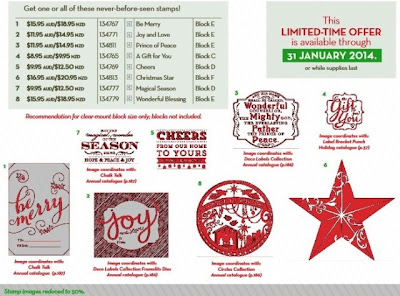
Single Christmas Stamps

Take a look and see if one or more of these single Christmas stamps might be just the one(s) you need to finish off your collection for this year at least. 


Click on the picture to go to my online store for more information.


I've already ordered the 'Magical Season' stamp.  I can never have too many Christmas words and I suspect it's going to need some friends.

Click on the picture above to order any or all of the Single Christmas stamps.

When placing your online order don't forget to add September's Hostess Code - GT2RD7C2 - to your order and be in to win the hostess benefits.


Friday, July 26, 2013

Tips & Tricks Friday - How to order 24/7 or when you can't get hold of me

You will have seen the Shop 24/7 button at the bottom of every post.  It's a great way to shop when you want to without having to get hold of me.  If you want the personal touch and some help with your ordering I will be here as usual.

Your order is processed as soon as you hit the submit button and is delivered directly to your door.  You can be in total control of the process.  

Sometimes it can be a little confusing clicking on a link and being asked to set up an account so I thought I'd take this opportunity to step you through the process.

When you click on the Shop 24/7 button at the bottom of my blog posts you will find yourself in this screen - 


Click on Create Account, which will drop you into this screen - 


Fill in the required fields and click Continue.  You will find yourself back in the first screen above.  


Click through the menu options on the left hand side of the screen until you find the product you wish to purchase - click on add to bag.


You can now choose to 'Continue Shopping' or 'Check Out'

When you click on the 'Check Out' button 5% Shipping will be added to your order with a minimum of $9.95.  Enter your credit card details and your order will sent to be processed and delivered directly to you.

If at any time in the process you have queries please contact me so I can help resolve your queries or process the order for you.